

Technical Risks, Best Practices, and Safer Alternatives for Freelancers & Employees
Introduction
For many remote workers, freelancers, and contractors, being asked to install a client‑provided or employer‑managed Virtual Private Network (VPN) has become an all‑too common requirement. At face value, this seems like a simple step — a VPN gives secure access to internal resources. But beneath the surface, this setup introduces numerous security, privacy, and operational risks that are rarely acknowledged in client onboarding documents.
This article — grounded in cybersecurity research, industry surveys, and academic insights — unpacks these risks, explains why VPN mandates should be challenged, and offers technically sound alternatives depending on access needs.

What is a VPN (Technically)?
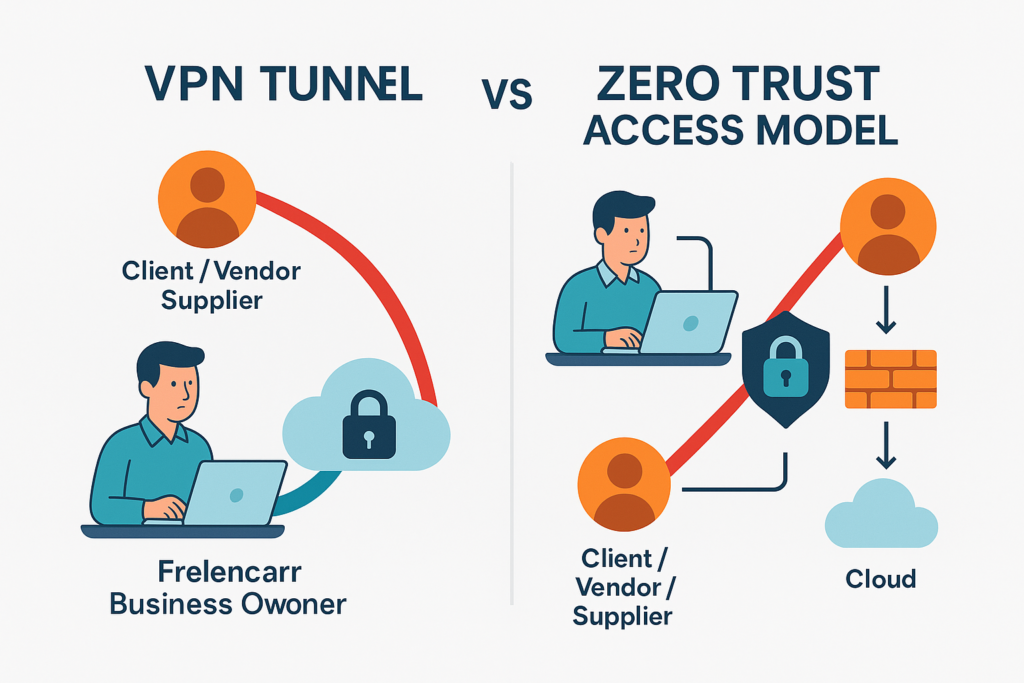
A Virtual Private Network (VPN) establishes an encrypted tunnel between a user’s endpoint (laptop/device) and a remote network over an untrusted network like the public Internet. This tunnel encapsulates and encrypts IP traffic, giving the sense of a secure connection into a private corporate environment.
However, the model is perimeter‑centric, trusting devices once connected and implicitly allowing broad access inside a network — a model now widely understood as insufficient in modern cybersecurity architectures.
Core Risks When You Install a Client/Employer VPN
1. End Node Trust & Cross‑Contamination
When a VPN client connects your personal or work laptop into another organization’s network, your device becomes an “end node” — a lesser‑trusted device suddenly trusted by the corporate network. This is a well‑recognized cybersecurity concern known as the End Node Problem.
Why it matters:
- Your device may not meet the client’s security posture (patch levels, EDR, configuration).
- Malware on your device can propagate into the client’s environment once connected.
- Data leakage between your other clients and that internal network becomes possible.
Bottom Line: You’re injecting an unmanaged device into a trusted environment.
2. Broad Network Trust & Implicit Permissions
Traditional VPNs typically grant wide network access once authenticated, often far beyond what a contractor reasonably needs. This violates the principle of least privilege — only accessing necessary assets — and increases the attack surface dramatically.
Modern research and industry surveys consistently show that enabling VPN access for third‑party users remains one of the leading vectors for network compromise.
3. Credential Theft & Exploitation
VPN endpoints are attractive targets for attackers because compromised credentials grant direct access into internal networks. In a recent industry report, nearly 48% of organizations reported VPN‑related breaches, with credential theft and persistent unauthorized access cited as key threats.
4. Protocol, Implementation & Software Vulnerabilities
Academic security analyses have documented widespread vulnerabilities in enterprise VPN clients — including privilege escalation bugs, insecure architectural choices, and platform‑specific flaws.
Risks include:
- Unpatched CVEs in client software
- Privilege escalation
- Remote code execution vulnerabilities
Even well‑maintained VPN implementations require constant security testing and patches — a maintenance burden often underestimated by clients.
5. DNS Leaks & Routing Weaknesses
VPN clients that use split tunneling or poorly configured DNS routing can inadvertently expose internal queries or fail to secure all traffic. This can lead to DOM leaks where DNS requests bypass the VPN tunnel entirely.
This breaks the assumption of “secure connection” and can be exploited by attackers monitoring network traffic.
6. Third‑Party Vendor Access Risk
Granting VPN access to external contractors — without robust visibility and monitoring — opens backdoors into corporate networks. Surveys show that organizations view third‑party VPN access as a significant security concern and major attacker vector.
Why You Should Resist Mandated VPN Installation
As a freelancer, it’s reasonable — and professional — to request alternative access approaches before installing a remote access client under another organization’s control. You also preserve your own cybersecurity posture and reduce potential liability if a breach were to occur.
Key Issues to Raise:
- Endpoint security requirements (what baseline configurations and protections are required?)
- Scope of access (what internal resources will I truly need vs broad network access?)
- Liability and monitoring policies
- Data handling and logging practices
Risk Mitigation Strategies (If VPN Can’t Be Avoided)
If you must use a client VPN, implement strict safeguards:
- Use isolated environments (e.g., dedicated VM or sandboxed OS image)
- Disable split tunneling unless explicitly needed
- Enforce endpoint compliance checks (patch levels, EDR installed)
- Multi‑factor Authentication (MFA)
- Reconnect only when needed
- Network segmentation & least privilege access controls
- Agreed policy on logging and monitoring

These controls reduce risk but do not eliminate the fundamental trust issue inherent in traditional VPN models — especially for third‑party users.
Modern Alternatives to VPN Mandates
Due to growing concerns around VPN security, IT organizations are increasingly adopting Zero Trust Network Access (ZTNA), identity‑centric access, and cloud‑native remote access solutions.

1. Zero Trust Access (ZTNA)
Zero Trust ensures access is granted based on identity, device posture, and contextual verification, not network location. This approach:
- Limits access to specific applications
- Requires continuous verification
- Eliminates broad network trust
2. Identity‑Driven Access (SAML/OIDC)
Instead of a VPN tunnel, clients can provide access via modern identity protocols that enforce role‑based and least‑privilege access.
3. Secure Remote Desktop / Cloud Workstations
In scenarios where sensitive internal environments are accessed, cloud‑hosted workstations or remote desktops provide access without routing traffic through a network VPN.
4. Jump Servers / Bastion Hosts
Rather than exposing full network, use jump hosts that provide controlled access to specific systems under strict logging and MFA.
When VPN Might Still Be Necessary
While VPNs carry risk, they continue to serve certain functions when properly hardened:
- Connecting to legacy systems with no modern access options
- Environments requiring layer 2 access
- Systems only reachable via internal IP ranges
In these scenarios, insist that your client:
- Justify the need
- Provide security documentation
- Apply network segmentation
- Make their VPN client undergo penetration testing
Conclusion
Requiring external contractors or employees to install a client’s VPN should no longer be seen as standard operating procedure — especially given the proven security risks, high‑profile breaches, and architectural limitations of traditional VPN models. Modern identity‑ and context‑based access controls like Zero Trust are superior in mitigating lateral movement, exposure risk, and unnecessary network trust.
Protect your business and your clients by questioning VPN mandates, proposing secure alternatives, and insisting on defined scope and secure practices when VPNs cannot be avoided.
Works Cited
- VPN Exposure Report 2025 – Cybersecurity Insiders – Nearly half of organizations experienced VPN‑related breaches and many are shifting toward Zero Trust.
- National Security Agency / CISA — Selecting & Hardening Remote Access VPN Solutions – Government guidance on VPN use, risks, and mitigations.
- End Node Problem — Wikipedia – Explains risks when unmanaged devices join trusted networks.
- Zero Trust Architecture — Wikipedia – Defines the modern secure access model reducing reliance on perimeter VPNs.
- Academic Security Analysis of VPN Implementations – Technical vulnerabilities documented in widely‑deployed enterprise VPN clients.
- Third‑Party Vendor Risk in VPN Access – Highlights how contractors and external users can introduce additional threat vectors.